
Real Debrid is the most popular option for Kodi users who want to access HD media with less buffer and more selections. If you want more HD links in Kodi today, then you need to subscribe to Real Debrid and read this Kodi guide below.
We always see tons of questions and comments such as:
“Why can’t I find any HD links in (addon name)?”
or
“How come (addon name) is always buffering my streams?”
The truth is, the majority of file hosts in today’s Kodi addons are provided for free and have limited bandwidth capabilities. These sites limit the download speed you are allowed to access them with and limit the quality of files that can be uploaded.
As well, the most popular Kodi addons have thousands of people trying to use the same streams at the same time.
All of these factors cause routine buffering.
Enter Real Debrid.
Real Debrid at a Glance
- What it is: a paid debrid service. Kodi addons send their links through it, so you get faster, higher quality streams than free file hosts give you.
- Price: from €3 for 15 days, or €4 for 30 days. Real Debrid bills in euros.
- Works with: Kodi addons (through ResolveURL), Stremio, and Firestick and Android TV apps such as Nuvio.
- Kodi setup: ResolveURL > Universal Resolvers > Real-Debrid > (Re)Authorize My Account, then enter the code at real-debrid.com/device.
- What changed in 2026: since May, Real Debrid blocks some cached files based on their filenames. The service is still running.
Last updated October 2026, including the Real Debrid content filter.
In this article, I’ll cover the following:
- What is Real Debrid?
- How Does Real Debrid Work?
- Is Real Debrid safe and legal?
- Does Real Debrid still work after the 2026 content filter?
- How much does Real Debrid cost?
- Real Debrid Fidelity Points
- Real Debrid free version and promo code
- Sign up for a Real Debrid account on Kodi
- Set up your Real Debrid account on Kodi
- Which apps work with Real Debrid?
- Real Debrid Device Pairing
- Can you use Real Debrid on multiple devices?
- Solutions for Real Debrid not working
- Real Debrid alternatives
What is Real Debrid?
Real Debrid is a paid service that gives you premium access to a large number of popular file hosts on the internet.
Your fee goes to maintaining and paying for those servers, so your download speeds are not limited and uploads are not capped to save space.
Debrid is a PREMIUM option that eliminates the issues that free file hosts have and makes addons buffer-free and high quality. It allows you access to more HD streams in Kodi.
How Does Real Debrid Work?
When you select a video stream from a Real Debrid file host, your premium account connects to that file linker instead of a basic free connection. The locker quickly verifies your account and then passes the stream to your Kodi session with all speed restrictions lifted.
Free file hosts slow downloads down on purpose to push you toward their own paid plans. Real Debrid pays for premium access and hands the stream to Kodi without those limits, which is why links that buffer on a free host often play cleanly through it.
It also works with torrents. Real Debrid keeps popular torrents cached on its own servers, so when a magnet link is already cached you stream it from Real Debrid instead of waiting on other people’s connections.
Is Real Debrid Safe and Legal?
Is Real Debrid Legal?
Real Debrid says it doesn’t host the files it serves, and its terms state that it can’t verify what users download. The same terms forbid using the service to download copyright-infringing files and say doing so can get your account suspended. In May 2026 Real Debrid also told TorrentFreak that it considers itself a technical intermediary under EU and French law.
The service is one thing and what you stream is another. Streaming copyrighted material without permission is illegal in many countries, and the rules depend on where you live. We can’t give legal advice, so check your local rules.
Is Real Debrid Safe to Use?
Safety mostly comes down to your account and your addons. Use a strong, unique password for your Real Debrid login and keep it to yourself. The terms say only the account holder may use the account, that connections are recorded to catch account sharing, and that sharing the account or generated links leads to a suspension.
Install addons only from sources you trust. A shady addon is a bigger risk than the debrid service itself. Many Kodi users also run a VPN as a privacy precaution, and our best VPN for Kodi and Firestick guide covers the options.
Does Real Debrid Still Work After the 2026 Content Filter?
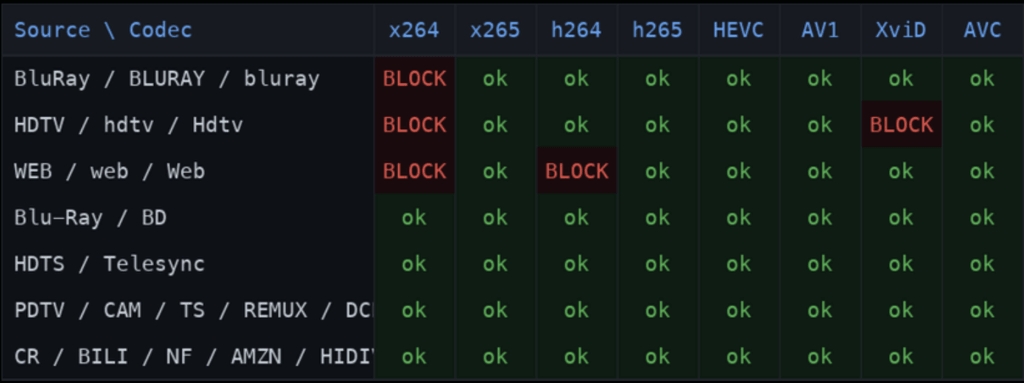
Yes, the service is still running, but it behaves differently than it did a year ago. Around May 10, 2026, Real Debrid started blocking cached files based on keywords in their filenames. If a link that used to play now fails, you may see the message “File was removed from debrid service due to copyright infringement.”
Real Debrid confirmed to TorrentFreak that it is filtering, said the filtering responds to keyword lists from trusted flaggers under EU law, and said it is unrelated to its May corporate restructuring. Which releases get blocked has shifted over time. Our Real Debrid content filter explainer has the full timeline and what you can do about it.
For most Kodi users Real Debrid is still the best-supported debrid service. If the filter is costing you too many streams, compare it with the alternatives below.
How Much Does Real Debrid Cost?
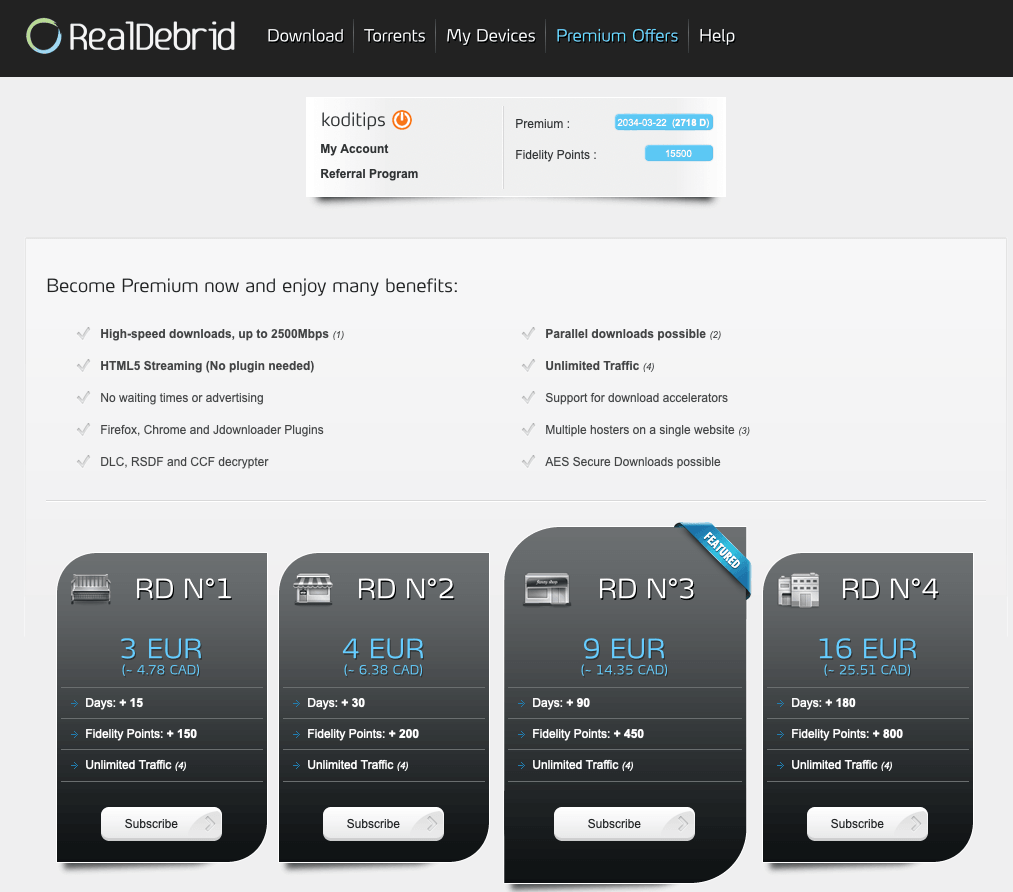
Real Debrid bills in euros, so the price in dollars moves a little with the exchange rate. There are four plans:
| Plan | Price | Fidelity points earned |
|---|---|---|
| 15 days | €3 | 150 |
| 30 days | €4 | 200 |
| 90 days | €9 | 450 |
| 180 days | €16 | 800 |
Per day, the 15-day plan works out to about €0.20, the 30-day plan about €0.13, the 90-day plan €0.10 and the 180-day plan about €0.09. If you are only testing, the 15-day plan is the cheapest way in. If you plan to keep it, the longer plans cost noticeably less per day.
The checkout page shows which payment methods are available in your country. Real Debrid’s terms allow a full refund only if you haven’t used the account within 7 days of paying. Any use, even a little, cancels that option.
The risk to try the service is very low.
Click here to sign up for a Real Debrid account!
What are Real Debrid Fidelity Points?
In addition, when you buy a premium package you earn Real Debrid fidelity points.
Fidelity points can be put towards extra free premium time for Real Debrid on Kodi. The company rewards users for continuing to subscribe to their service.
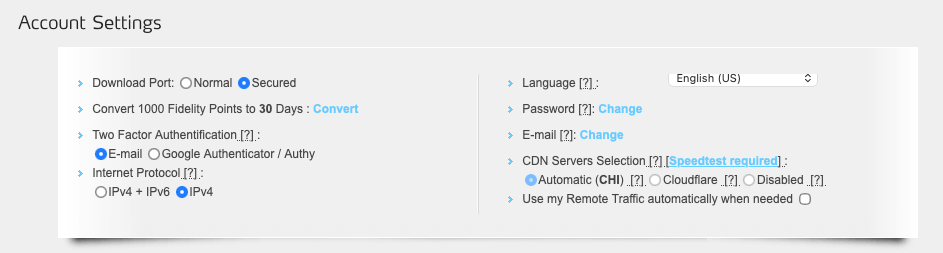
The rate you can convert your fidelity points into premium days is 1000 points per 30 days. At 200 points per 30-day plan, five paid months earns you roughly one free month.
In addition, you also receive Fidelity points when you refer your friends to the service. Each person you refer gives you an extra 5 days on your premium service, plus 50 fidelity points too.
If you are interested in trying Real Debrid, simply click here and sign up for an account!
Is There a Real Debrid Free Option?
You might be thinking “Real Debrid sounds great but I want to try it for free before I make a purchase.”
You can create a Real Debrid account for free, but the service is sold as paid premium access, so plan on paying for it. Some guides describe limited free access during certain morning hours. We couldn’t confirm that with Real Debrid, so don’t count on it.
If you want to get your hands on the premium features, you get the option to purchase just 15 premium days for €3 if you don’t want to commit long-term. That is the cheapest way to try it and see for yourself.
Real Debrid Promo Code
We haven’t found an official Real Debrid coupon code or offer. At €3 to try it, there isn’t much to discount.
Be careful with sites that sell discounted Real Debrid accounts or vouchers. Real Debrid’s terms don’t allow reselling premium accounts without permission, and a bad voucher can leave you with nothing. Buy directly from Real Debrid.
How to Sign Up For A Real Debrid Kodi Account
To sign up for the Real Debrid Kodi account, follow the below steps.
Step 1: Create Your Account
First, head to the Real Debrid website and sign up for a free account. You will have to pick a username and password and confirm your account via email. Standard stuff.
Step 2: Sign In
Once you have confirmed your email, sign in to your Real Debrid account.
Step 3: Open the Premium Page
On the top banner, click on “Premium“
Step 4: Choose a Plan
Scroll down and you will see your buying options. Select the package you want to try, and click “Subscribe“.
Step 5: Pay
Choose your payment method and follow the instructions to pay for your premium account. After your account is processed and you show as a premium user, you can set up Real Debrid on Kodi!
How to Set Up Real Debrid on Kodi
Real Debrid works in Kodi through ResolveURL, a helper that addons install as a dependency. You set it up once and every addon that uses ResolveURL picks up your account. Here are the short steps. For a screen-by-screen walkthrough, see our full guide to authorizing Real Debrid in Kodi.
- From the Kodi main menu, go to Settings (gear icon) > System > Add-ons > Manage dependencies. If you don’t see Manage dependencies, switch the settings level to Advanced at the bottom left.
- Select ResolveURL, then Configure. If ResolveURL isn’t listed, install an addon that uses it, such as Umbrella, and check again.
- Open the Universal Resolvers tab.
- Scroll down to Real-Debrid and switch on Enabled and Torrent Support.
- Select (Re)Authorize My Account to start the Real Debrid device pairing process, covered in the pairing section below.
- When you are done, click OK to save settings and return to the main menu.
Addons that use Real Debrid links will now route them through your premium account.
Individual Addon Setup
Some Kodi add-ons require you to login to Real Debrid from within their specific addon settings. This is in addition to the ResolveURL instructions above.
When you install a multi-source Kodi addon such as Umbrella or Seren, check out the addon settings. If there is an option to login to Real Debrid, take advantage and make sure you sync your account. Not sure what ResolveURL is? Our ResolveURL explainer covers it.
Which Apps Work With Real Debrid?
Real Debrid isn’t tied to Kodi. Any app that supports it can use your account.
Kodi Addons That Use Real Debrid
Multi-source addons such as Umbrella and Seren work with Real Debrid. Our best Kodi addons list shows which others support debrid links.
Stremio
Stremio uses Real Debrid through addons such as Torrentio. You add your Real Debrid account on the addon’s configuration page.
Firestick and Android TV Apps
Apps such as Nuvio take Real Debrid through a Torrentio addon. Our Torrentio Nuvio guide shows how to connect it.
Real Debrid Device Pairing
During the configuration above, you’ll be asked to perform the Real Debrid device pairing procedure.
In the addon, you’ll be asked to authorize your Real Debrid account. Kodi shows a code. Go to real-debrid.com/device on your phone or computer, type in the code, log in if asked and approve the request. The code expires after 30 minutes, so finish the process before then.
After your account is synced, you’ll be able to access all of Real Debrid’s features.
You are now set up for Real Debrid Kodi content! You should notice that the Real Debrid source shows up first whenever you go into a movie or TV show.
Can You Use Real Debrid on Multiple Devices?
Real Debrid’s terms say only the person who holds the account may use it, that connections to the account are recorded to detect sharing, and that sharing the account or generated links leads to a suspension. Using your own account on your own TV and phone is one person using one account. Handing it to family or friends in other places is where people get into trouble.
Some guides, such as TroyPoint’s, say the service expects one location at a time. Real Debrid’s own terms don’t spell out an IP limit, so treat that as a caution, not a rule.
Real Debrid Not Working? Fixes That Usually Work
Re-Authorize Your Account
If you think that Real Debrid is not working for you, the number one thing we would suggest you try is re-authorizing in the ResolveURL settings. Open the Real-Debrid section, use Reset My Authorisation, then run (Re)Authorize My Account again.
This will ensure that your Kodi setup is synced back to your Real Debrid account on the web.
Check That Your Premium Time Hasn’t Run Out
The second thing to try is to check your account and make sure that you are still a premium user. We’ve had tons of people online tell us the service is down, only to discover that their premium account has lapsed.
“File Was Removed From Debrid Service Due to Copyright Infringement”
This message means the file you picked was blocked by Real Debrid’s content filter. Your account and Kodi setup are fine. Try another source or release of the same title. The content filter explainer covers why it happens.
“IP Address Not Allowed”
Real Debrid’s API lists “IP Address not allowed” as an error it can return, but it doesn’t document when or why. If you see it, turn your VPN off or switch servers, then re-authorize. If it keeps happening, contact Real Debrid support.
Streams Still Failing in Your Addon?
If Real Debrid is authorized and active but an addon still comes up empty, the problem is probably the addon or the source. Our guide to fixing “No Stream Available” in Kodi walks through it.
Real Debrid Alternative
If you are looking for a Real Debrid alternative, Premiumize is a very similar service that offers the same features:
- Premium link resolving
- Torrent and magnet support
- HD media with less buffer
Premiumize is a little more expensive, but comes with additional features such as cloud storage. It also gets our recommendation if you are interested.
Other alternatives to Real Debrid are AllDebrid and TorBox. Our list of the best Real Debrid alternatives compares them, and our guide to setting up TorBox in Kodi shows how to switch. You can also read the older Real Debrid vs Premiumize vs All Debrid vs LinkSnappy guide.
Real Debrid is a paid service, which will turn people off. Just remember, your favorite Kodi add-ons are FREE and you should expect FREE quality.
Real Debrid on Kodi is one option for giving yourself a more flawless Kodi experience. Hopefully, this review gives you a good idea of what to expect from the service!
Frequently Asked Questions
How much is a Real Debrid account?
Real Debrid costs €3 for 15 days, €4 for 30 days, €9 for 90 days or €16 for 180 days. It bills in euros, so the price in dollars shifts slightly with the exchange rate.
Is Real Debrid legal?
Real Debrid says it doesn’t host the files it serves, and its terms forbid using it to download copyright-infringing files. Whether what you stream is legal depends on the content and on where you live.
Is Real Debrid safe?
Use a strong, unique password and don’t share your account. Real Debrid’s terms say only the account holder may use it, and sharing can get it suspended. Only install addons from sources you trust.
Is Real Debrid still worth it after the content filter?
For most Kodi users, yes. Since May 2026 it blocks some cached files by filename, but it is still the most widely supported debrid service in Kodi addons. If you are losing too many streams, compare the alternatives covered above.
Is there a free Real Debrid account?
You can create an account for free, but Real Debrid is sold as a paid service. Some guides mention limited free access at certain hours. We couldn’t confirm that with Real Debrid, so don’t count on it. The cheapest way in is €3 for 15 days.
Do I need a VPN with Real Debrid?
No, Real Debrid works without one. Many Kodi users run a VPN for privacy. See our best VPN for Kodi guide for the options.
How do I pay for Real Debrid?
The checkout page lists the payment methods available in your country. Current guides mention cards, Amazon Pay and cryptocurrency.
Can I get a refund on Real Debrid?
Real Debrid’s terms allow a full refund if the account hasn’t been used within 7 days of payment. Any use, even minimal, cancels the refund.
PROTECT YOURSELF ON THE INTERNET
Sign up for a premium Kodi VPN and access the internet unrestricted. We offer exclusive discounts for IPVanish and NordVPN, the highest respected VPNs in the Kodi community. Both of these VPNs have some great features for users:
Apps for Android, iOS, Mac, Linux & more
Zero Logs
Unlimited bandwidth
Tier 1 hardware (no speed slowdown)
Access to servers hundreds of VPN servers